Sign in using your Timaru District Libraries membership number.
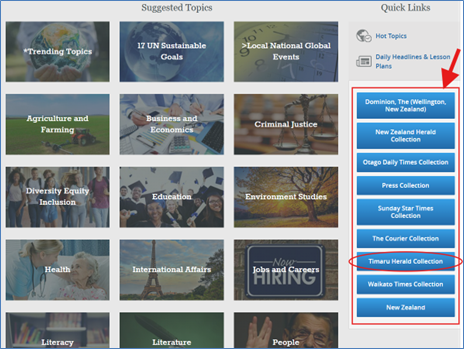
Scroll down to use the blue buttons for quick access to our most popular publications like The Dominion, New Zealand Herald, Otago Daily Times, The Press, Sunday Star Times, The Timaru Herald, The Courier (Timaru) and the Waikato Times.
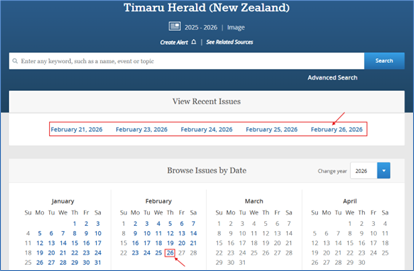
When you click on a publication like The Timaru Herald, you will see two results. Select the second one which says ‘image’ under the format column.
Choose the date you want to read, either from the links at the top of the page or by clicking on the calendar date.
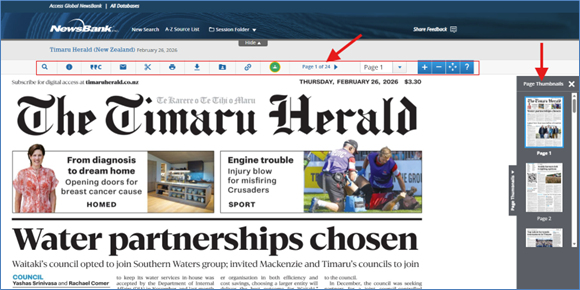
Your selected issue will load in the full digital image version. You can then navigate through the pages by either clicking on the Page Thumbnails to the right of the page, or on the blue arrow beside the page number in the toolbar above the publication. You can also email, print, download, save to a folder and more from this toolbar.
If you want to do a more in-depth search, you can use the Search Bar at the top of the page to enter any keyword, such as a name, event or topic to search all of the NewsBank site (go to our Online Tutorials section in our Digital Resources to watch a short video on how to do this).
Or you can go to the A-Z Source List at the top of the page (on a computer, or you will find this in the Menu at the top right on a mobile device) to find a specific publication by alphabetical order.
You can also scroll to the very bottom of the page and click on the ‘Help’ section for more in-depth instructions.